


Ben Collins – Google Sheet Bootcamp
-
 Last Updated: 01-08-2020
-
 Duration: 18.76 hour(s), 151 video(s)
-
 Size: 3.7 GB
$39
Buy More, Save More!
2 Courses
10% OFF
3 Courses
15% OFF
5 Courses
30% OFF
Why Choose TSCourses?
-
 Learn online or download via Google Drive
-
 All course files are included
-
 Free course updates via email
-
 Seen it cheaper? We'll beat the price
Course Description
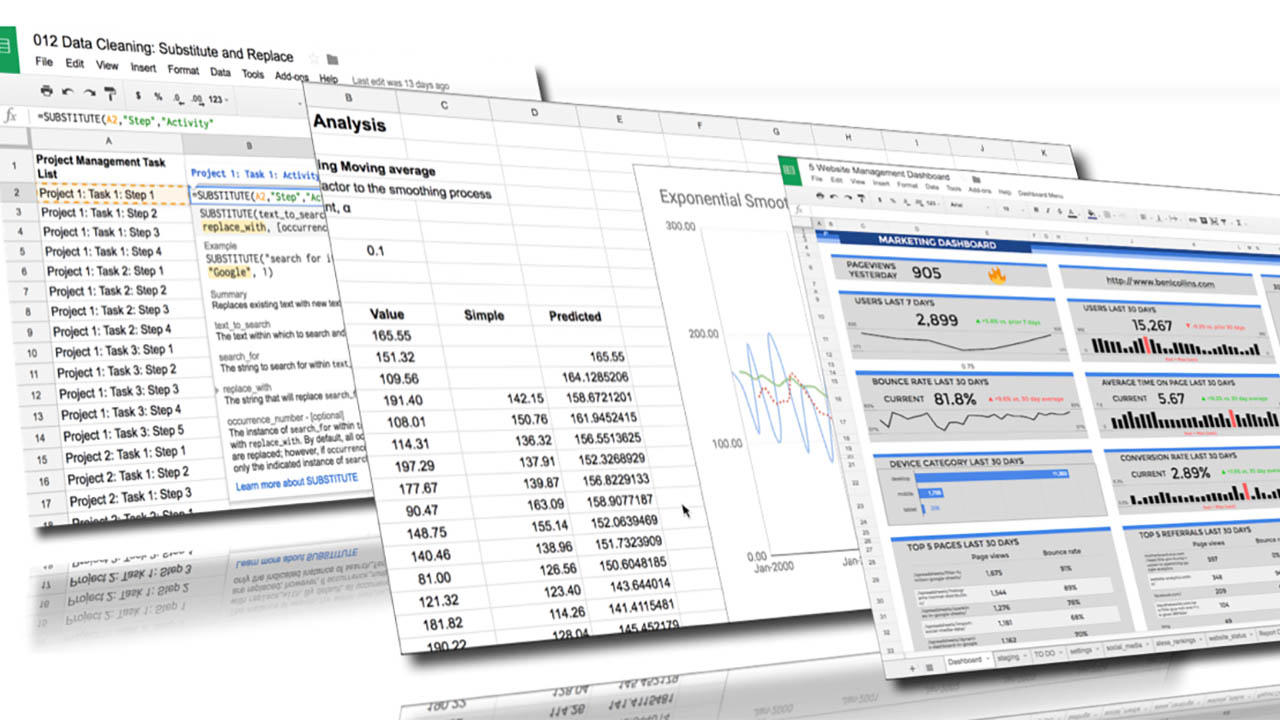
If you’ve ever stared at a messy spreadsheet thinking “there has to be a better way,” Ben Collins – Google Sheet Bootcamp is exactly the shortcut you’ve been looking for.
And with TSCourses, you don’t just get the skills – you get them at the lowest price on the market, with instant access and zero hassle.
Let’s unpack why this specific bootcamp stands out for entrepreneurs, marketers, freelancers, students, and anyone who wants to turn Google Sheets into a real competitive advantage.
Who is Ben Collins – and why do his Google Sheets courses have a cult following?
Ben Collins is not just “good with spreadsheets.” He is one of the most recognized Google Sheets experts in the world.
He has been officially recognized by Google as a Google Developer Expert for G Suite/Google Workspace, a title given to only a small number of professionals globally. His training has been used by professionals from Fortune 500 companies, fast-growing startups, and solo entrepreneurs who want to level up their data skills.
Before creating his own training programs, Ben taught data and analytics courses at General Assembly, and he now runs The Collins School of Data, where thousands of students learn Google Sheets, Apps Script, and data analytics through his signature style: short, practical, real-world lessons that get straight to the point.
What makes his teaching so popular?
• Super practical: He uses real datasets from fields like sales, marketing, finance, and operations.
• Bite-sized lessons: Typically 5–10 minutes each, so you can learn between meetings or while traveling.
• Clear explanations: No fluff, no jargon for the sake of it – just straightforward explanations with on-screen demos.
• Career-focused: Everything is geared around saving you time, eliminating repetitive tasks, and helping you make better business decisions.
In other words: he teaches Google Sheets not as “school math,” but as a weapon for real business results.
What is the Google Sheet Bootcamp all about?
The Google Sheet Bootcamp (often referred to around the web as Ben Collins’ Google Sheets-focused bootcamp) is designed to take you from “I kind of understand spreadsheets” to “I can build automated, insightful, and professional-grade dashboards and workflows in Google Sheets.”
Unlike many free YouTube tutorials that give you isolated tricks, this bootcamp is structured as a complete path:
• You start with the essentials: layout, navigation, data types, formatting, basic formulas.
• You move into productivity: collaboration, sharing, version control, find and replace, integrations.
• You unlock analytical power: pivot tables, charts, filters, data validation, summaries.
• You finish with automation and smart workflows: connecting with Forms, building reporting templates, and setting up systems you can reuse forever.
The emphasis is on real-world application, not theory. You’ll be building sheets that look like the ones you wish your boss had given you years ago.
A closer look at the curriculum (what you’ll actually learn)
Different versions and bundles of Ben’s Google Sheets training exist, but the core bootcamp content follows a similar blueprint – and that’s what makes it so effective.
Here’s how the journey typically unfolds:
1. Foundations: Getting truly comfortable in Google Sheets
You’ll learn how to:
• Navigate the interface quickly and efficiently
• Work with multiple sheets and large datasets
• Understand rows, columns, cells, ranges, and data types
• Use best practices for naming, organizing, and structuring your files
This might sound basic – but most people are never properly taught this foundation. Once you clean up the way you structure your sheets, everything else becomes easier and faster.
2. Collaboration and cloud workflows
Since Google Sheets lives in the cloud, teamwork is built in – and Ben shows you how to use that properly:
• Sharing files securely and intelligently
• Managing permissions (view, comment, edit)
• Using comments and notes to communicate with your team
• Tracking changes and preventing “someone just broke the file” disasters
• Publishing to the web and integrating with other Google tools
If you’re an entrepreneur, manager, or freelancer working with clients, this alone can transform your daily workflow.
3. Core formulas and functions – the “language” of Sheets
This is where you shift from “typing numbers” to “building systems.”
You’ll learn:
• Logical functions like IF, AND, OR
• Lookup formulas like VLOOKUP, INDEX/MATCH, and more modern equivalents
• Text functions for cleaning messy data
• Date and time formulas for timelines, schedules, and reports
• Common math and aggregation functions like SUMIFS, COUNTIFS, AVERAGE, and others
Ben doesn’t just show you what the formulas do – he shows you how to combine them for powerful reporting and automation.
4. Pivot tables: the turning point for real analysis
Most people are intimidated by pivot tables. After this bootcamp, you’ll wonder why.
You’ll discover how to:
• Summarize huge datasets in seconds
• Slice your data by region, product, salesperson, channel, or campaign
• Build management-ready summary tables without manual work
• Answer business questions quickly using drag-and-drop analysis
If you work in marketing, sales, operations, or finance, this is where your ability to make data-driven decisions really accelerates.
5. Charts and data visualization
Raw tables don’t convince stakeholders – charts and visuals do.
Ben walks you through:
• Choosing the right chart type for the story you want to tell
• Building dashboards inside Google Sheets
• Formatting charts for clarity and professionalism
• Linking Google Sheets charts to Google Slides for presentations
If you present to clients, managers, or investors, this is where you start turning insights into decisions.
6. Integrations and smarter workflows
Modern businesses don’t just need spreadsheets – they need connected systems.
In the bootcamp, you’ll see how to:
• Connect Google Sheets with Google Forms to collect data automatically
• Pipe data from forms into organized, analysis-ready tables
• Use Sheets as a simple “backend” for tracking leads, orders, surveys, or applications
• Reuse templates and structures across multiple projects
Some versions of Ben’s training also introduce Google Apps Script and automation, helping you go beyond the interface and start automating repetitive tasks with simple code – like sending personalized emails based on sheet data or generating PDFs automatically.
Real student feedback – what people actually say about Ben’s training
Across Ben’s courses, workshops, and public appearances, a clear pattern emerges in student feedback:
• Students say they save hours every week by replacing copy-paste-heavy workflows with formulas and pivot tables.
• Professionals from companies like Google, Netflix, Verizon, PwC, and others have enrolled in his training to upgrade their day-to-day spreadsheet work.
• Many learners highlight his calm, clear, step-by-step teaching style – especially how he breaks complex topics into small, manageable lessons.
• Educators, non-profits, and small business owners often mention that they finally feel “in control” of their data rather than overwhelmed by it.
People don’t just say they “liked” the course – they say it changed the way they work.
Is this bootcamp right for you?
Ben Collins – Google Sheet Bootcamp is a particularly strong fit if you are:
• An entrepreneur or small business owner who needs to track revenue, expenses, campaigns, or operations without hiring a full-time analyst.
• A marketer who wants to make sense of campaign data, track funnels, and build performance dashboards.
• A trader or finance-focused professional who relies on numbers daily and wants faster, more reliable analysis.
• A student or career-switcher who wants a solid, marketable skill that immediately boosts employability.
• An operations, HR, education, or nonprofit professional who deals with lists, reports, and forms and wants to streamline the chaos.
If you already consider yourself a heavy power user who writes advanced Apps Script and builds complex, multi-source dashboards, this bootcamp might be a bit on the foundational side for you. But for beginner to early-intermediate users who want to become fast, confident, and analytical in Google Sheets, it hits the sweet spot.
Why get this course through TSCourses?
You could buy Ben Collins’ training directly at full price. But if you care about maximizing value, TSCourses gives you a serious edge.
Here’s what makes our offer different:
Cheapest price on the market
Our promise is simple: TSCourses commits to the lowest price you’ll find for Ben Collins – Google Sheet Bootcamp. You get world-class training for a fraction of what others are paying, without sacrificing quality.
Instant delivery via Google Drive
No waiting. No complicated onboarding. As soon as your payment is confirmed, you receive an instant Google Drive link so you can start learning right away. Perfect if you’re on a deadline or want to spend this weekend upgrading your skills.
High-speed download, zero friction
We host with performance in mind. You can stream or download the materials at high speed, so you’re not stuck buffering when you’re motivated to learn. And because you access the course via drive link, there’s no risk of your account being blocked for “too many logins” or similar issues.
15-day satisfaction guarantee
We are confident in the value of this course – and we put our policy behind it. If within 15 days you feel the course is not right for you, reach out and we’ll make it right. This makes your purchase low-risk and high-reward.
Our brand promise: The Best Place to Learn Online Courses
TSCourses isn’t just a marketplace; it’s a curated learning hub. We hand-pick courses that are genuinely useful and respected in their fields. Ben Collins
More courses you might like

Justin Sardi – Video Ads Cracked
If you’re serious about turning YouTube into a predictable traffic and sales machine, Justin Sardi’s...
The Real World – AI Copywriting
Imagine this: you’re staring at a blank screen, deadline breathing down your neck, and your...

The Digital Marketing Misfits – Anonymous Influencer 2023
# Turn Your Spare Time into Amazon Commission Gold: Is Anonymous Influencer Worth Your Investment?...
Leon Castillo – Selfmastered Roadmap
If you’re an entrepreneur or ambitious professional who feels you’re operating at 40–50% of your...